YouTube summarizer Chrome extension
By Stanislav Mashkin · Published 5 September 2026
Open a video and the summary is already there — docked beside the player, on youtube.com itself. No second tab, no copying links. Free, and your first one needs no account.
Works in Chrome, Edge, Brave, Opera and Arc · no card · uninstalls in two clicks
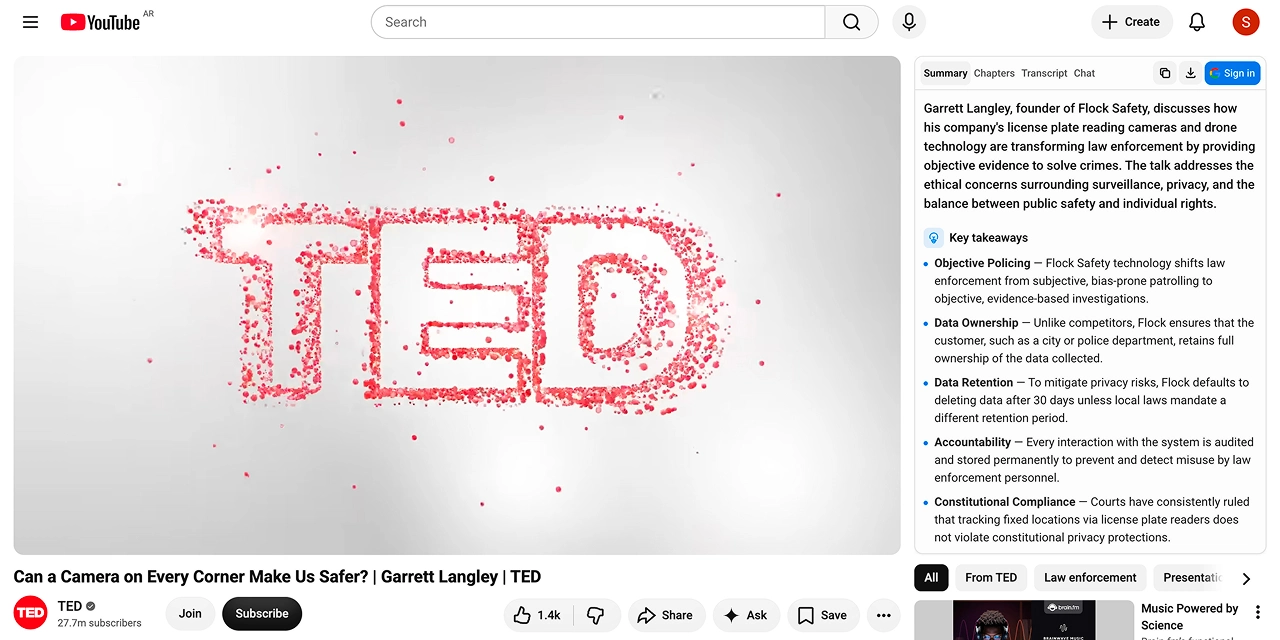
Four tabs, one pass over the video
Everything below is generated together, the first time you ask. Switching tabs costs nothing extra.
Summary
A one-line TL;DR, then the key takeaways. The answer to "is this worth 40 minutes" arrives before you have scrolled the comments.
Chapters
The video split into sections with real timestamps, including for creators who never added any. Click one and the player jumps.
Transcript
The full text beside the video, every line stamped and searchable. No daily cap on this one inside the extension.
Chat
Ask the video a follow-up question and get an answer that points back at the second it was said.
What the extension gives you that the website doesn't
Both surfaces share one account and one history. These are the differences worth installing for.
| Extension | Website | |
|---|---|---|
| Free summaries a day | 5 for your first 3 days, then 3 | 1 without an account |
| Transcripts | No daily cap | Ten a day |
| Where it opens | Beside the player, on the video page | A tab you paste the link into |
| Coming back to a video | Cached per video — instant, and free again | Cached too, once you are signed in |
The transcript is the one thing we hand out with no meter on either surface — if that is all you came for, thetranscript page does it without installing anything.
How to install it
1. Open the Chrome Web Store listing
This one — published by Stanmash Ltd, the company named on ourAbout page.
2. Add to Chrome, then approve the prompt
Chrome lists what the extension may touch before it installs anything. What is on that list, and why, is the next section — worth ten seconds of your time for any extension, not just this one.
3. Open any YouTube video
The panel appears beside the player. Hit summarise; the first one runs without signing in. Nothing to configure, no API key to paste.
What Chrome will ask you to approve
A browser extension can be a serious thing to install, and most pages like this one skip the subject. Here is the whole list, in Chrome's words, with ours next to it.
Read and change your data on youtube.com
This is the sidebar. The extension only runs on youtube.com — that single host, plus our own server, is the entire list. It has no access to your other tabs, your bank, or the page you are reading now.
Storage
Summaries, transcripts and chats are kept per video so re-opening one is instant and costs you nothing from your daily allowance.
Identity
Sign in with Google, and only if you choose to. The sign-in window is handled by Chrome itself; we never see your password.
Alarms and scripting
Housekeeping: refreshing your quota when the day rolls over, and injecting the panel into a video page that YouTube swapped in without a reload.
What we do with what we store — and what we don't do with it — is written out in theprivacy policy. The short version: your history is tied to your Google account, we don't sell data, and we don't train models on your usage.
Chrome, and everything built on it
Edge, Brave, Opera and Arc are Chromium browsers and install straight from the Chrome Web Store — same listing, same button. Vivaldi behaves the same way.
Safari and Firefox use different extension formats, so this one does not run there yet. Neither do mobile browsers: Chrome on Android and iOS has no extension support at all. On a phone, use the website — it does the same job with a link paste.
What it doesn't do
Four limits, said here rather than discovered after you install.
Videos with no captions at all. A summary is built from the video's caption track. Most videos have one, including the ones YouTube auto-generates — but when there is genuinely none, we can't turn the audio into text today. Running speech recognition costs real money per minute, and we would rather not put that on the price before we know people want it.
Anything that isn't YouTube. Vimeo, Twitch, a lecture portal, an MP4 on a drive — no. The extension is scoped to youtube.com and that scope is the reason its permission list is as short as it is.
Videos over four hours. Podcasts and conference talks are comfortably inside that; a twelve-hour livestream VOD is not.
Unlimited anything. The free plan is a real number of summaries a day, not a trial that quietly expires, and Pro is a bigger number rather than the word "unlimited". Both are on thepricing page with the ceilings printed.
Free, and what Pro adds
Free, signed in: 5 summaries a day for your first 3 days, then 3 a day, 30 a month,3 follow-up questions a day, and transcripts with no cap.
Summaries come out in the video's own language, or in the language your browser is set to — both free. Reading a video in a language that is neither is translation, and that is what Pro is for, along with 500 summaries a month and 50 questions a day.
Add it and try a video
Free, no card, and the first summary needs no account.